If you work with technical documentation, especially product manuals, safety guides, or reference documentation for complex equipment, there is a good chance you have encountered Adobe FrameMaker. And if your organization translates these documents into multiple languages, you may already sense that the current process could be faster and less error-prone.
This article explains what Adobe FrameMaker is, why it is used for technical documentation, and how combining it with an XLIFF workflow can make your translation process significantly more efficient.
What is Adobe FrameMaker?
Adobe FrameMaker is professional desktop publishing software specifically designed for creating long, structured technical documents. Unlike general-purpose word processors, FrameMaker is built for documents that are complex, consistent, and subject to frequent revision.
It handles things that most word processors struggle with: documents that are hundreds of pages long, complex tables that span multiple pages, consistent formatting across an entire document set, cross-references that automatically update when sections are renumbered, and conditional content that allows you to maintain multiple variants of a document (for example, different product models) within a single source file.
FrameMaker is also one of the primary tools for working with structured XML authoring, including the DITA standard (Darwin Information Typing Architecture), which is widely used in technical documentation for manufacturing, engineering, aerospace, and defense industries.
Why do companies use FrameMaker for technical documentation?
The industries that rely on FrameMaker most heavily are those that produce large volumes of structured documentation with strict consistency requirements:
Manufacturing and industrial equipment companies produce operating manuals, maintenance guides, safety documentation, and spare parts catalogs. These documents follow precise formatting standards, often defined by industry guidelines or customer requirements.
Aerospace and defense organizations manage thousands of pages of technical maintenance documentation that must be accurate, consistently formatted, and compliant with regulatory standards.
Medical device companies produce regulatory submission documents, instructions for use, and service manuals that must meet strict quality and formatting requirements.
Technology companies with complex hardware products use FrameMaker for technical reference guides and installation documentation.
What these use cases have in common: the documents are large, they are updated regularly, they must be exactly right, and they often need to be available in multiple languages.
The translation challenge with FrameMaker documents
FrameMaker creates documents in proprietary file formats (.fm for unstructured documents and .xml for structured content). The structure of a FrameMaker document is rich and complex: paragraphs have specific styles, tables have defined column widths, cross-references are live links, and conditional tags control what content appears in which variant.
This complexity creates a significant challenge for translation.
If you take a FrameMaker document, export it to Word or PDF, and send it to a translator, the translator will produce a translated Word document. But then what? Someone has to manually put the translated text back into FrameMaker. They have to re-apply all the paragraph styles, re-create the cross-references, fix the tables, and ensure the conditional content is set correctly. For a 200-page manual, this can take days of skilled layout work in every target language.
This approach is slow, expensive, and introduces new errors at every step.
The alternative is to use XLIFF.
How an XLIFF workflow changes the process
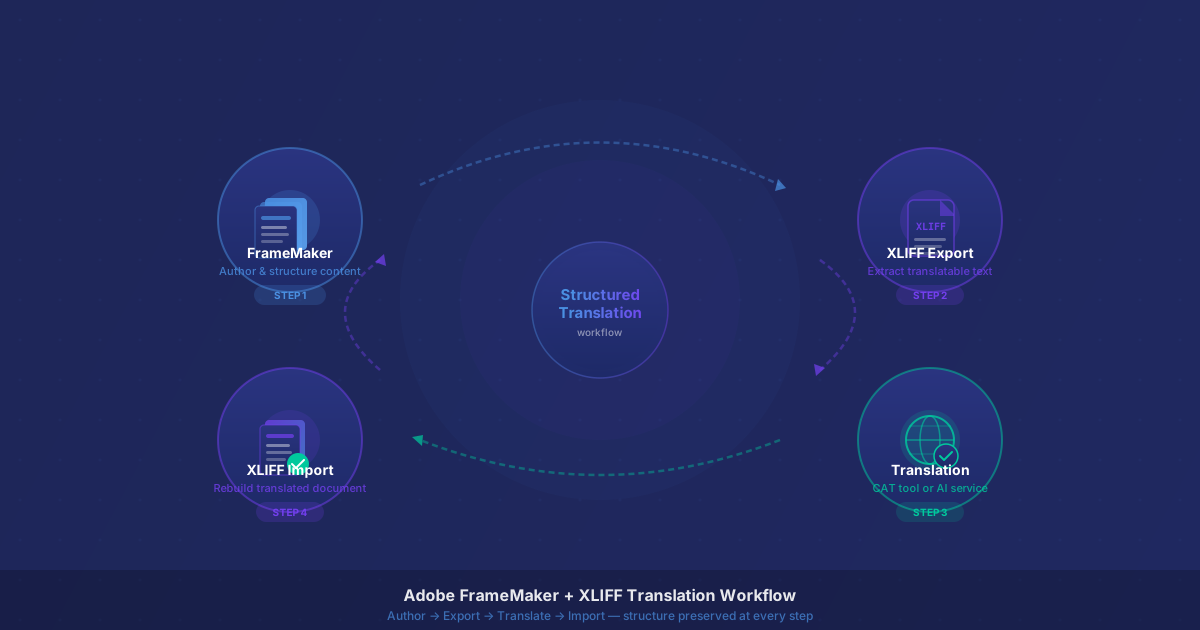
Instead of exporting the document to a word processor and translating it there, an XLIFF-based workflow extracts only the translatable text from FrameMaker, passes it through translation, and then imports the translated text back into FrameMaker, keeping the original document structure intact.
Here is what the process looks like step by step.
Step 1: Export XLIFF from FrameMaker
FrameMaker has built-in support for exporting content as XLIFF. For structured (XML/DITA) documents, this is handled through the standard export mechanisms. For unstructured FrameMaker documents, plugins from FrameMaker or third-party providers handle the extraction.
When FrameMaker exports XLIFF, it reads through your document and pulls out every paragraph, heading, table cell, and other translatable text element. Each one becomes a translation unit in the XLIFF file. Formatting codes, such as bold text, italic text, cross-reference markers, and variable placeholders, are converted into inline elements inside the translation unit, where they are preserved but kept separate from the actual words.
The result is a clean XLIFF file that contains exactly what needs to be translated and nothing else.
Step 2: Send the XLIFF for translation
The XLIFF file goes to your translation provider, translation management system, or an AI-powered translation service. Translators work in their CAT tools (professional translation software like memoQ, Trados Studio, or Phrase) or the XLIFF can be processed directly by an automated translation engine.
Crucially, translators do not need access to FrameMaker. They do not need your original document files. They simply work through the translation units in the XLIFF file, providing target-language equivalents for each source segment while keeping the inline elements (formatting codes) in the correct positions.
Step 3: Apply translation memory
If you have translated previous versions of this document, or other documents in your library, a translation memory database can automatically fill in previously translated content. Headings, safety warnings, standard procedures, and regulatory boilerplate that have not changed since the last version do not need to go through translation again. Only new or modified segments require a translator's attention.
For organizations that update their manuals regularly, this step alone can reduce the amount of new translation work by 30% to 60% or more on a typical revision.
Step 4: Import the translated XLIFF back into FrameMaker
When the translated XLIFF file comes back, FrameMaker imports it and places the translated text back into the original document structure. Paragraphs go back into their correct styles. Tables are rebuilt. Cross-references remain live. Conditional content stays correctly tagged.
The result is a fully formatted, translated version of your document, with the same visual appearance and structural integrity as the source. In most cases, the only follow-up work needed is a final review for text expansion (some languages take significantly more space than English) and a check on any figures or graphics that contain embedded text.
What about figures and graphics with text?
XLIFF handles text inside the document body, but it does not automatically translate text that is embedded inside graphics, such as diagrams, callouts in technical illustrations, and similar visual elements.
For documents with significant amounts of text in graphics, teams typically maintain a set of source files for each graphic, recreate them in the target language, or use linked callout text that can be handled through the XLIFF workflow. This is a known limitation of any text-extraction approach, not specific to XLIFF, but worth planning for in a documentation workflow.
The benefits in practice
Translators do not need FrameMaker. This simplifies your vendor relationships significantly. Any professional translator with a CAT tool can work on a FrameMaker-generated XLIFF file without any knowledge of the original authoring tool.
No reformatting after translation. The single biggest time sink in traditional document translation, recreating the layout in each target language, disappears entirely. The translated document is ready to review and publish directly from the import step.
Faster turnaround for revisions. When a product changes and the manual needs to be updated, only the modified content goes through full translation. Everything else is handled by translation memory. For a company that releases product updates every six months, this makes a substantial difference in translation lead times.
Consistent terminology across all languages. Shared glossaries and terminology databases ensure that product names, part designations, safety terms, and technical specifications are translated the same way everywhere, across all documents, all languages, and all translators.
Scalable to any number of languages. Adding a new language to an existing workflow does not require rebuilding the process. The same XLIFF file can be sent to a translator in any language, and the translated output imports back into FrameMaker the same way.
Is this workflow realistic for your team?
If your organization already uses FrameMaker and translates its documentation, the answer is almost certainly yes. FrameMaker's XLIFF support is mature and well-documented. Most professional translation providers and translation management systems work with XLIFF as a standard format.
The main things to evaluate are:
- Whether your FrameMaker version and document type (structured or unstructured) support the export you need
- Whether your translation partners accept XLIFF input (most do)
- Whether you want to build a translation memory from existing translated documents before starting
If you are not yet using a professional authoring tool and are translating FrameMaker-exported PDFs or Word copies by hand, this is a natural transition point to invest in a structured workflow that will save time on every future document.
The combination of FrameMaker's structured content capabilities and XLIFF's clean translation exchange format is one of the most reliable approaches available for professional technical documentation, used by some of the largest manufacturing and engineering organizations in the world for exactly the reasons described here.
Have XLIFF files ready for translation? Upload them to AI-DocTranslate for fast, structure-preserving AI translation. Also read: How XLIFF Helps Machine-Building Companies Translate Manuals